Not Just Laptops is supported by readers like you. When you buy through links on our site, we may earn a small commission at no additional cost to you. Learn more.
Zoom or rather any other video conferencing application has become quite common among working professionals, high-school & college students, or anyone who is working from home. Finding the right webcam that is compatible with Zoom doesn’t come without its share of challenges.
While we know that you need a reliable webcam, the tougher question is, how to find the best one?
Unlike a webcam that is traditionally used for content streaming, the one suited for Zoom and other related applications like Skype, Google Meets, etc, must be bolstered with high-end microphones, an excellent field of view, and decent low-light performances.
Most of us end up purchasing generic webcams when we should be looking for options with excellent AF or even Fixed Focus capabilities. Besides, the major pet peeve when it comes to selecting a Zoom-compatible webcam is the inability to identify one with a powerful acoustic setup.
Other pain points include purchasing a device without standard security measures like a kill switch, biometric login, privacy shutter, and microphone muting support.
At Laptops251, we help you scale beyond these pain points by helping identify the best webcams for Zoom and other video conferencing applications. We have tested more than 50 variants, only to come up with a list of webcams best suited for video conferencing, albeit with the focus being on Zoom.
During our extensive research, we have zeroed in on webcams that offer multi-app support, responsive UI, privacy features, excellent microphone, and budget-based compatibility.
Table of Contents
- Top 7 Webcams for Zoom
- 1. Best with Ring Light: Razer Kiyo
- 2. Zoom Certified: NexiGo N990
- 3. Best 4K Webcam with Privacy Shutter: Logitech BRIO
- 4. Best Portable Video Conference Camera: NexiGo N3000
- 5. With Gesture Control and AI Tracking: Insta360 Link
- 6. The Smartest Video Conference Camera: Meeting Owl 3
- 7. Best Webcam for College Students: Logitech C920x
- FAQs about Webcams for Zoom
- Why is a fixed focus webcam still good enough for Zoom calls?
- Is it important to invest in a device featuring video compression standards?
- What is the significance of FoV when it comes to purchasing webcams?
- Which portability features to look for while purchasing a webcam for video conferencing?
- How important is multi-software compatibility when it comes to selecting a webcam for Zoom?
- Verdict
Top 7 Webcams for Zoom
Undeniably, there are quite a few relevant webcams in the market that are best suited for Zoom calls and team meetings. However, we have extensively tested 19 of the best devices that are currently available in the market, precisely to come up with the top 8 offerings.
In addition to lending adequate support to Zoom sessions, each of these webcams can be used for other impactful software solutions like Cisco Webex, Skype, Hangouts, Jabber, and whatnot.
1. Best with Ring Light: Razer Kiyo
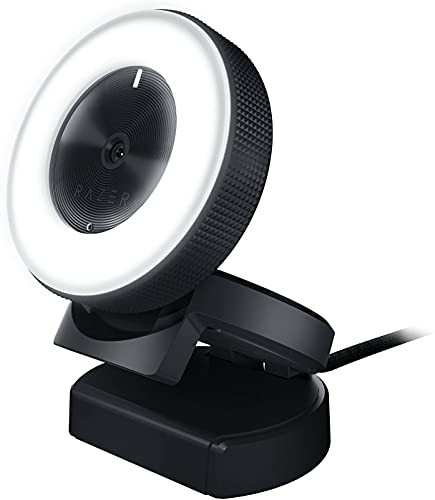
- Resolution: FHD
- Zoom: 3X Optical Zoom
- Connectivity: USB
- Microphone: Built-in
- Focus: Autofocus
- Privacy Shutter: N/A
- Special Features: PC / Mac, Webcam, Face Tracking
Stepping into the realm of professional video conferencing, the Razer Kiyo emerges as a standout choice. With its impressive blend of performance and features, it’s a webcam that doesn’t compromise on delivering exceptional quality while being budget-friendly.
Boasting a Full HD resolution, the Kiyo ensures that your visuals are crisp and clear, allowing you to engage with your audience effectively.
What sets the Razer Kiyo apart is its 3X optical zoom capability. This feature enables you to adjust the framing of your video feed with impressive precision, giving you the flexibility to highlight specific details or present a wider perspective as needed.
With a simple USB connectivity setup, you’ll find the Kiyo easy to integrate into your existing workflow.
Audio is equally crucial in virtual interactions, and the built-in microphone of the Razer Kiyo ensures that your voice comes across distinctly. While the Kiyo doesn’t include a privacy shutter, it compensates with compatibility across PC and Mac platforms.
This versatility ensures that regardless of your operating system, you can confidently deploy the Razer Kiyo for your video conferencing needs.
- What We Like
- FHD Clarity
- Optical Zoom
- USB Connection
- Autofocus
- Versatile Compatibility
- What We Don’t Like
- No Privacy Shutter
- Limited Zoom
2. Zoom Certified: NexiGo N990

- Resolution: 4K
- Zoom: 5X Digital Zoom
- Connectivity: USB
- Microphone: Dual Stereo Mics, 2×3.5mm Audio Jacks for External Mics
- Focus: N/A
- Privacy Shutter: N/A
- Special Features: Low Light
The NexiGo N990 sets the bar higher with its 4K resolution, offering a level of visual detail that ensures a truly immersive experience for your video conferences. This heightened resolution captures finer nuances, making your visuals more engaging and professional.
The inclusion of 5X digital zoom enhances the N990’s capabilities, allowing you to focus on specific elements within your frame.
Audio quality is equally vital, and the NexiGo N990 delivers in this department with dual stereo microphones. Additionally, the presence of 2×3.5mm audio jacks for external microphones gives you the flexibility to further enhance your audio setup if desired.
With USB connectivity, setup is straightforward, and the N990 excels in low-light conditions, ensuring that your video feed is well-lit and clear.
While the N990 lacks autofocus and a privacy shutter, its strengths in video and audio quality make it a compelling choice for those who prioritize enhanced visuals and audio clarity in their video conferences.
- What We Like
- 4K Brilliance
- Zooming Capabilities
- Versatile Audio
- Low-Light Performance
- Multiple Audio Inputs
- What We Don’t Like
- No Autofocus
- No Privacy Shutter
3. Best 4K Webcam with Privacy Shutter: Logitech BRIO

- Resolution: 4K
- Zoom: 5x Digital Zoom
- Connectivity: USB
- Microphone: Noise-Canceling Mic
- Focus: N/A
- Privacy Shutter: N/A
- Special Features: Infrared
The Logitech BRIO stands as a testament to the company’s commitment to delivering top-tier webcams. Offering a 4K resolution and 5x digital zoom, the BRIO ensures that every pixel of your video feed exudes professionalism.
This heightened resolution and zooming capability are particularly valuable when you need to present intricate details or capture larger settings within your frame.
Audio quality is another strength of the BRIO, thanks to its noise-canceling microphone. This feature ensures that your voice comes through crystal clear, even in noisy environments.
A unique addition is the infrared feature, providing an extra layer of security to your video feed. USB connectivity ensures that integrating the BRIO into your setup is a hassle-free process.
Despite the absence of autofocus and a privacy shutter, the Logitech BRIO excels in delivering superior video and audio quality. It’s an ideal choice for those who prioritize exceptional visuals and audio clarity in their virtual meetings.
- What We Like
- 4K Brilliance
- Powerful Zoom
- Noise-Canceling Mic
- Infrared Security
- USB Connectivity
- What We Don’t Like
- No Autofocus
- No Privacy Shutter
4. Best Portable Video Conference Camera: NexiGo N3000

- Resolution: 4K
- Zoom: 5X Digital Zoom
- Connectivity: USB
- Microphone: 4-Mic Array
- Focus: N/A
- Privacy Shutter: N/A
- Special Features: Low Light
The NexiGo N3000 enters the scene with its 4K resolution, ensuring that your video conferences are marked by stunning clarity and detail. With the added benefit of 5X digital zoom, you can focus on specific aspects of your presentation, enhancing your ability to engage your audience effectively.
Audio quality is a strong suit of the N3000, featuring a 4-microphone array that captures your voice with exceptional clarity. This ensures that your communication remains smooth and uninterrupted throughout your virtual meetings. With USB connectivity, setting up the N3000 is a breeze.
The webcam’s ability to perform well in low-light conditions adds to its appeal, allowing you to maintain a clear and well-lit video feed.
While lacking autofocus and a privacy shutter, the NexiGo N3000 is an excellent choice for those seeking a webcam that balances impressive video and audio quality with versatile performance.
- What We Like
- 4K Clarity
- Zooming Capability
- 4-Mic Array
- Low-Light Performance
- USB Connectivity
- What We Don’t Like
- No Autofocus
- No Privacy Shutter
5. With Gesture Control and AI Tracking: Insta360 Link

- Resolution: 4K
- Zoom: 5X Digital Zoom
- Connectivity: USB
- Microphone: Dual Noise-Canceling Microphones
- Focus: Auto-Focus
- Privacy Shutter: N/A
- Special Features: Gesture Control, Auto-Focus, Dual Noise-Canceling Microphones
The Insta360 Link takes a unique approach to webcams, offering a 4K resolution and 5X digital zoom alongside advanced features like gesture control, HDR, and AI tracking. This impressive combination empowers you to create dynamic and engaging video conferences that capture the attention of your audience.
The webcam’s auto-focus function ensures that your visuals remain sharp, even when you’re moving within the frame. Dual noise-canceling microphones guarantee clear and distortion-free audio, enhancing the quality of your communication. The 1/2” sensor further contributes to superior video quality.
The Insta360 Link is packed with features that enable you to elevate your video conferences to the next level. Although it lacks a privacy shutter, its advanced capabilities make it a compelling choice for those seeking to stand out in virtual meetings.
- What We Like
- 4K Excellence
- Zooming Abilities
- AI Tracking
- Auto-Focus
- Dual Noise-Canceling Mics
- What We Don’t Like
- No Privacy Shutter
- No Autofocus
6. The Smartest Video Conference Camera: Meeting Owl 3
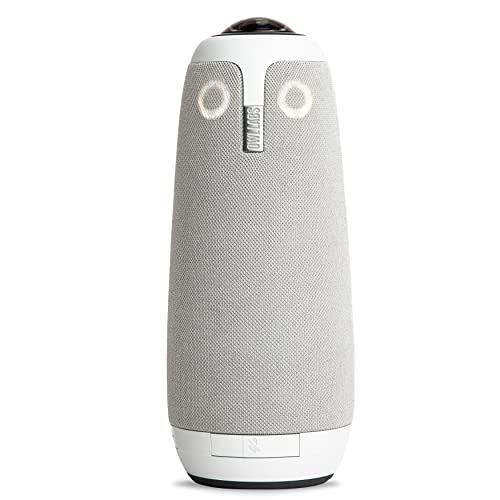
- Resolution: FHD
- Zoom: 5X Digital Zoom
- Connectivity: USB
- Microphone: Microphone, and Speaker (Automatic Speaker Focus & Smart Zooming)
- Focus: N/A
- Privacy Shutter: N/A
- Special Features: 360 Degree
The Meeting Owl 3 takes a distinct approach to webcams by offering a 360-degree view, ensuring that everyone in the room is included in the video feed. This feature is particularly useful for hybrid meetings that involve both in-person and remote participants.
The webcam also features 5X digital zoom, allowing you to focus on specific aspects of the room when needed. Moreover, the Meeting Owl 3 incorporates automatic speaker focus and smart zooming, further enhancing the video conferencing experience.
While it lacks autofocus and a privacy shutter, the Meeting Owl 3’s unique approach to video conferencing makes it an invaluable tool for collaborative and inclusive meetings.
- What We Like
- 360-Degree View
- Zooming Capability
- Automatic Speaker Focus
- Inclusive Meetings
- Smart Zooming
- What We Don’t Like
- No Autofocus
- No Privacy Shutter
7. Best Webcam for College Students: Logitech C920x
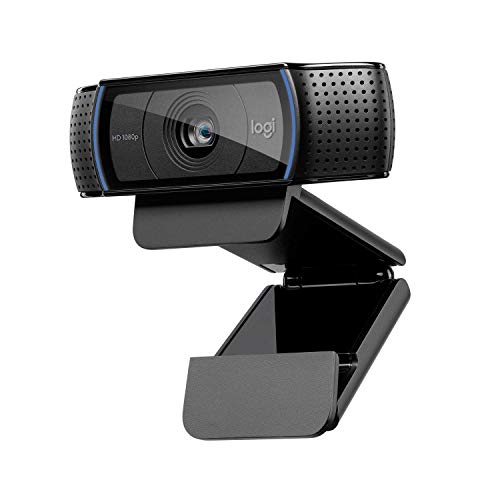
- Resolution: FHD
- Zoom: 5X Digital Zoom
- Connectivity: USB
- Microphone: Dual Mic
- Focus: N/A
- Privacy Shutter: N/A
- Special Features: Low Light
The Logitech C920x brings reliability and quality to the forefront. With its Full HD resolution and 5X digital zoom, it ensures that your video conferences maintain a professional and engaging quality.
The webcam’s dual mic setup contributes to clear audio communication, enhancing your interactions.
While lacking autofocus and a privacy shutter, the C920x excels in delivering consistent and dependable performance. It’s an ideal choice for those who prioritize video and audio quality in their virtual meetings.
- What We Like
- FHD Clarity
- Zooming Capability
- Dual Mic
- Consistent Performance
- Reliable Quality
- What We Don’t Like
- No Autofocus
- No Privacy Shutter
FAQs about Webcams for Zoom
Why is a fixed focus webcam still good enough for Zoom calls?
While we would always recommend a webcam with AF capabilities, you can still get one with a Fixed focus, if video conferencing is one of your priorities. Unlike streaming where you need the webcam to focus automatically on the subject, desk-based online meetings hardly concern subjects that keep moving.
However, even if you are planning to get a more affordable option with Fixed Focus support, opt for the one with a longer range. This would help if you plan on sitting at a fair distance from the device.
Is it important to invest in a device featuring video compression standards?
Modern streaming is all about sending forth data segments or rather streams, which might put a lot of pressure on your internet connection and the CPU pertaining to the host.
Therefore, it is advisable to look for a webcam that supports H.264 video compression standard. This attribute ensures that the webcam sends across high-quality snippets while minimizing the encoding and even decoding pressure on the processor.
What is the significance of FoV when it comes to purchasing webcams?
For video conferencing, you need to emphasize the Field of View more than anything else. While a wide-angle webcam lens can do the job for you, it boils down to the coverage area you are planning to go with. For instance, something in the 60-degree ballpark is sufficient if you are simply sitting in front of the desk.
However, if there are two people trying to get featured, 78 degrees is a good count to consider.
While you can always opt for larger FoVs, it is advisable to purchase a device that supports vertical alignment, to capture additional resources at once.
Which portability features to look for while purchasing a webcam for video conferencing?
Although some might invest more in AF and light correction capabilities, we would urge you to get a portable webcam, provided you are more of a globetrotter and you do not want work to take a backseat.
While USB 2.0 or higher is preferred so as to facilitate plug-and-play usage, it is necessary to consider devices with dedicated clams, privacy enhancements, and a customizable base unit for seamless attachments.
How important is multi-software compatibility when it comes to selecting a webcam for Zoom?
Zoom, as a go-to video conferencing tool, supports Chatbot and other software-based integrations. Besides, every device you consider pairing the webcam with comprises a select camera-focused UI, which needs to be prioritized.
Therefore, it is necessary to invest in a webcam that syncs perfectly with diverse software solutions while paving the way for customizations.
Verdict
Each of the 9 webcams fits into your Zoom-based repertoire with seamless ease. However, if you are still clueless about targeted selections, here are certain use cases to look at.
- While if privacy is your concern, we recommend the Logitech BRIO. This one comes integrated with a privacy shutter for preventing phishing attacks with ease.
- If you’re always on the go and need to move the subject around, consider a good webcam with Autofocus. The Razer Kiyo is best for travelers.
Apart from that, we have also enlisted options based on Digital Zoom, noise cancellation, Field of View, and other relevant capabilities.