
Not Just Laptops is supported by readers like you. When you buy through links on our site, we may earn a small commission at no additional cost to you. Learn more.
Although Roblox is a 15-year-old game, and therefore not very demanding. Finding the best laptop that can run Roblox can be tricky.
Lots of parents looking to buy a laptop for their kids end up spending too much money on an overpowered gaming laptop. Or, even worse, they don’t spend enough and purchase a machine with outdated hardware.
We’ve reviewed 56 models and narrowed them down to 9 of the best in terms of their price and performance. In short, we hand-picked the best value models for playing Roblox, watching Youtube or Netflix, and even studying.
Since its release in 2006, Roblox has remained one of the most popular multiplayer games among young children and teenagers alike. The ability to create and share games within the Roblox game platform has kept it relevant to this day, and everyone wants to join in on the fun.
If you’re wondering what laptops can you play Roblox on, read on.
Table of Contents
Minimum & Recommended System Requirements
| Minimum | Recommended | |
|---|---|---|
| CPU | 11th Gen Intel Core i3 or AMD Ryzen 3 5000 series | 12th Gen Intel Core i5 or AMD Ryzen 5 6000 series |
| RAM | 8GB | 16GB |
| Storage | 256GB SSD | 512GB SSD |
| Display | 14-inch FHD (1920 x 1080) | 15.6-inch FHD (1920 x 1080) |
| GPU | Integrated Intel Iris Xe or AMD equivalent | 4GB NVIDIA GeForce RTX 3000 or AMD RX 6000 series |
*Keep in mind that the 20MB storage refers to the base game alone. You’ll need around 500-700MB of storage to download and run an average Roblox game.
Buying Guide for Laptops for Roblox
How Much Power Do I Need to Play Roblox?
As a gaming platform, Roblox is not demanding at all in and of itself. Any Windows 7, Windows 8/8.1, or Windows 10 computer will be able to run it too, as said by the company. Over time, the games built within Roblox have become more and more complex, therefore requiring beefier rigs to run them without lag.
Requirements depend on the game.
Luckily, Roblox is CPU-focused, meaning it doesn’t need a top-of-the-line graphics card. A 2-core processor running at 1.6GHz is still capable of playing Roblox, but not at the highest settings. A 4th gen Core i5 will give you 60 frames at the best possible settings.
What Kind of Display Should I Consider?
Any standard 720p display will do just fine, but a 1080p panel is a better option. You can run Roblox in 4K (in theory.) But due to the textures’ resolution being limited by the game engine, increasing the resolution to 4K will only enlarge the textures and make them look blurry.
What About Battery Life?
It depends. If you want to game or use the laptop at the same spotty, battery life is irrelevant. A laptop that holds 6-7 hours of battery life with moderate use will usually give you 4-5 hours of use at full power.
Are Ports Important?
The more ports you have, the more accessories you can connect. More USB ports allow you to plug in a keyboard, a mouse, a gamepad, and other peripherals simultaneously. You can use them to charge your phone or even connect an external monitor.
How We Selected the Best Laptops for Roblox
We started with a list of 56 of the best-selling laptops. We then made sure that each and every laptop on this list meets the minimum requirements to run Roblox at 30-60 fps, depending on the graphics settings.
When considering RAM, we opted for 4 GB DDR4 as the bare minimum. Anything below 4 GB would struggle with even the most basic tasks such as web browsing and MS Office, let alone playing Roblox.
Budget-wise, the average amount we considered came at around $400-$600. Laptops in this price range come packed with 128-256GB of SSD storage. This is more than enough to run Roblox and perform everyday tasks efficiently and leave room for other programs. For those who are looking for a better laptop, we also included a few higher-budget gaming models.
For connectivity, we considered 2 USB-A ports to be our minimum threshold, just enough room for a mouse and keyboard. It goes without saying, all of these laptops have built-in Wi-Fi and Bluetooth connectivity, as do all modern laptops today.
Top 7 Laptops for Roblox
What are the best laptops for playing Roblox? Well, if you’re looking to avoid lagging then these 10 models should be at top of your list.
Most of these laptops can also be used for school work, web browsing, and other activities, depending on their hardware.
We also included some higher-end models towards the end in case you or your child are into video editing or play more resource extensive games.
1. Affordable Performance: Acer Aspire 3
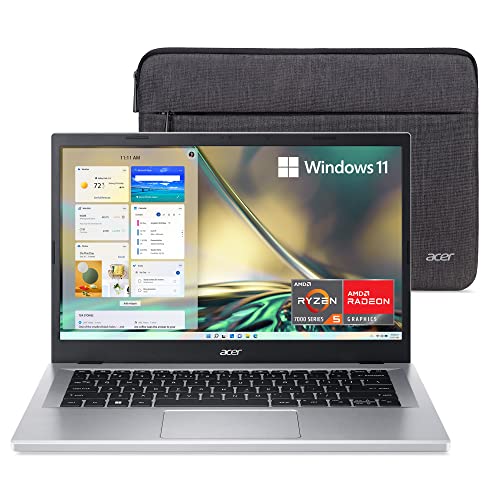
- CPU: 2.8GHz AMD Ryzen 5 7520U
- RAM: 8GB DDR5
- Storage: 512GB SSD
- Display: 14-inch FHD (1920 x 1080)
- GPU: Integrated Radeon 610M
- Battery: Up to 7 hours
If you’re searching for a laptop that can enhance your Roblox experience without breaking the bank, the Acer Aspire 3 is a worthy contender. With its impressive specifications, compact design, and reliable performance, the Aspire 3 is the perfect companion for your Roblox adventures.
Roblox Adventures Unleashed: With a 2.8GHz AMD Ryzen 5 7520U processor, the Acer Aspire 3 provides reliable performance for your Roblox adventures.
Whether you’re exploring virtual worlds, building creations, or participating in thrilling gameplay, this laptop ensures smooth and responsive gameplay, allowing you to fully immerse yourself in the Roblox universe.
Crisp Visuals on a Compact Display: Featuring a 14-inch FHD (1920 x 1080) display, the Acer Aspire 3 offers crisp visuals that bring your Roblox creations to life.
The compact screen size allows for easy portability while still delivering sharp details and vibrant colors. Dive into the Roblox world and appreciate every visual element with this immersive display.
Efficient Storage and Memory: Equipped with a 512GB SSD and 8GB DDR5 RAM, the Acer Aspire 3 provides ample storage and memory to accommodate your Roblox games and creations. You can store your favorite Roblox games, mods, and other multimedia content without worrying about running out of space.
The fast SSD ensures quick loading times, allowing you to jump into your Roblox adventures without delay.
Lightweight and Portable Design: Weighing just 3.09 lbs, the Acer Aspire 3 is designed with portability in mind. Its lightweight and slim construction make it easy to carry, enabling you to take your Roblox experiences with you wherever you go.
Whether you’re gaming on the move or attending Roblox events, the Aspire 3 offers the perfect balance between performance and portability.
In conclusion, the Acer Aspire 3 is a cost-effective choice for Roblox enthusiasts who prioritize portability and affordability. With its reliable performance, crisp display, efficient storage, and lightweight design, this laptop ensures an enjoyable and immersive Roblox experience.
However, it’s important to consider the limitations of the integrated graphics and the limited processing power when considering this model.
- What We Like
- Reliable performance
- Crisp display
- Efficient storage and memory
- Lightweight and portable
- Affordable price
- What We Don’t Like
- Integrated graphics
- Limited processing power
2. Best for Gaming & Streaming: ASUS ROG Strix G16
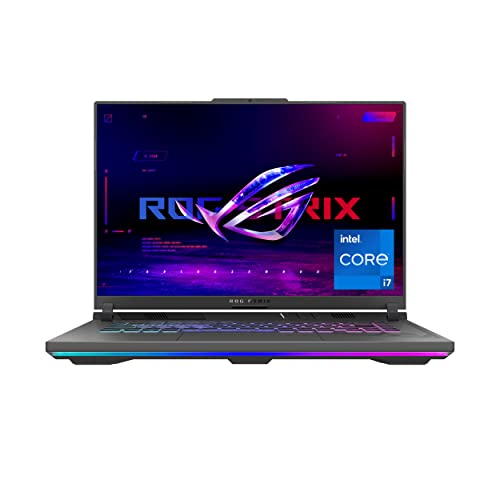
- CPU: 2.6GHz Intel Core i7-13650HX
- RAM: 16GB DDR5
- Storage: 512GB SDD
- Display: 16-inch FHD (1920 x 1200)
- GPU: 8GB NVIDIA GeForce RTX 4060
- Battery: Up to 8 Hours
The ASUS ROG Strix G16 is a standout choice. With its impressive specifications, immersive display, and powerful graphics, the ROG Strix G16 is designed to unleash your Roblox adventure like never before.
Unleash the Roblox Adventure: Powered by a 2.6GHz Intel Core i7-13650HX processor, the ASUS ROG Strix G16 ensures smooth and responsive gameplay for your Roblox adventures.
This powerful CPU allows you to explore vast Roblox worlds, engage in intense battles, and create captivating experiences without any performance hiccups.
Immersive Visuals on a Stunning Display: Featuring a 16-inch FHD (1920 x 1200) display, the ASUS ROG Strix G16 provides stunning visuals that bring your Roblox creations to life.
The high-resolution screen delivers vibrant colors, sharp details, and immersive visuals, allowing you to appreciate every aspect of the Roblox universe in rich detail.
Powerful Graphics Performance: Equipped with an 8GB NVIDIA GeForce RTX 4060 GPU, the ASUS ROG Strix G16 delivers exceptional graphics performance for Roblox. The dedicated graphics card ensures smooth rendering, realistic effects, and detailed graphics, enabling you to fully immerse yourself in the visually stunning world of Roblox.
Ample Storage and Memory: With a 512GB SSD and 16GB DDR5 RAM, the ASUS ROG Strix G16 provides ample storage and memory for your Roblox games and creations.
The spacious SSD ensures quick loading times, allowing you to jump into your favorite Roblox adventures without any delays. The generous memory ensures smooth multitasking and seamless gameplay.
Portable and Lightweight Design: Weighing just 5.51 lbs, the ASUS ROG Strix G16 combines power with portability. The laptop’s lightweight and sleek design make it convenient to carry, whether you’re gaming at home or on the go.
Enjoy the freedom to take your Roblox adventures with you and explore the virtual world from anywhere.
In conclusion, the ASUS ROG Strix G16 is a top choice for Roblox enthusiasts who demand exceptional performance and stunning visuals. With its high-performance CPU, immersive display, powerful graphics, ample storage and memory, and portable design, the ROG Strix G16 provides an unforgettable Roblox experience.
However, it’s worth considering the limited battery life and the higher price range as potential drawbacks when considering this model.
- What We Like
- High-performance CPU
- Stunning display
- Powerful graphics performance
- Ample storage and memory
- Portable and lightweight
- What We Don’t Like
- Limited battery life
- Higher price range
3. Great Value: Lenovo IdeaPad Gaming 3
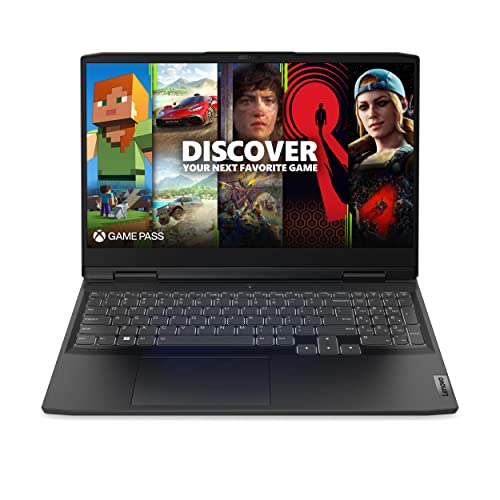
- CPU: 3.3GHz AMD Ryzen 5 6600H
- RAM: 8GB DDR5
- Storage: 256GB SSD
- Display: 15.6-inch FHD (1920 x 1080)
- GPU: 4GB NVIDIA GeForce RTX 3050
- Battery: Up to 5 hours

If you’re on the hunt for a laptop that can handle the demands of Roblox while offering great value for money, look no further than the Lenovo IdeaPad Gaming 3. With its impressive specifications, immersive display, and gaming-focused features, the IdeaPad Gaming 3 is the perfect gateway to your Roblox adventures.
Unleash Your Roblox Potential: Powered by a 3.3GHz AMD Ryzen 5 6600H processor, the Lenovo IdeaPad Gaming 3 provides ample power to run Roblox smoothly. With this capable CPU, you can dive into Roblox adventures, explore vast virtual worlds, and engage in thrilling gameplay without any performance hitches.
Immersive Visuals on a Full HD Display: The IdeaPad Gaming 3 features a 15.6-inch FHD (1920 x 1080) display that brings Roblox’s colorful universe to life. The high-resolution screen ensures sharp visuals and vibrant colors, allowing you to fully appreciate the intricate details of the Roblox world.
Smooth Graphics Performance: Equipped with a 4GB NVIDIA GeForce RTX 3050 GPU, the Lenovo IdeaPad Gaming 3 delivers smooth graphics performance for Roblox.
The dedicated graphics card enhances the visual experience, rendering detailed environments, lifelike characters, and immersive effects that will enhance your Roblox adventures.
Fast and Responsive Storage: With a 256GB SSD, the IdeaPad Gaming 3 offers fast and responsive storage for your Roblox games and files. The SSD ensures quick loading times, allowing you to jump right into your favorite Roblox experiences without any unnecessary delays.
Portable and Lightweight Design: Weighing only 5.01 lbs, the Lenovo IdeaPad Gaming 3 is designed for portability without compromising performance. Its lightweight and compact design make it easy to carry, allowing you to take your Roblox adventures with you wherever you go.
In conclusion, the Lenovo IdeaPad Gaming 3 is an excellent choice for Roblox enthusiasts seeking a reliable and affordable laptop. With its capable processor, immersive display, smooth graphics performance, fast storage, and portable design, the IdeaPad Gaming 3 ensures an enjoyable and seamless Roblox experience.
However, it’s important to note the limited battery life and relatively smaller storage capacity as potential trade-offs when considering this model.
Watch our Lenovo IdeaPad Gaming 3 Review
This YouTube review was created by the Not Just Laptops team. The specs may slightly differ from the laptop in the article.
- What We Like
- Capable processor
- Immersive Full HD display
- Smooth graphics performance
- Fast and responsive storage
- Portable and lightweight
- What We Don’t Like
- Limited battery life
- Relatively smaller storage capacity
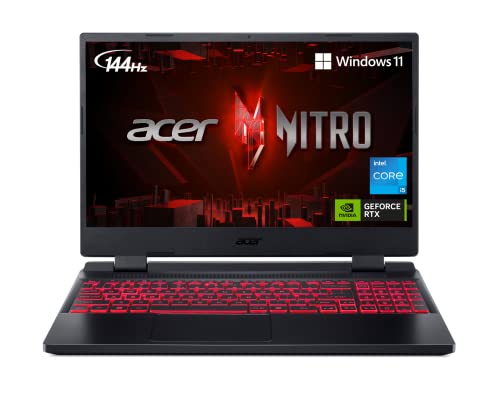
4. Best for Students: Acer Nitro 5
- CPU: 2.5 GHz Intel Core i5-12500H
- RAM: 8GB DDR4
- Storage: 512GB SSD
- Display: 15.6-inch FHD (1920 x 1080)
- GPU: 4GB NVIDIA GeForce RTX 3050
- Battery: Up to 6 Hours

If you’re searching for a reliable and affordable laptop to enhance your Roblox adventures, the Acer Nitro 5 is a fantastic choice. With its impressive specifications, immersive display, and gaming-centric features, the Nitro 5 is designed to unleash your full Roblox potential without breaking the bank.
Immerse Yourself in Roblox Adventures: Powered by a 2.5 GHz Intel Core i5-12500H processor, the Acer Nitro 5 ensures smooth gameplay and responsive performance for your Roblox adventures. Dive into virtual worlds, create imaginative experiences, and engage in thrilling gameplay without any lag or disruptions.
Vibrant Visuals on a Full HD Display: Featuring a 15.6-inch FHD (1920 x 1080) display, the Acer Nitro 5 delivers vibrant visuals that make the Roblox universe come alive. The high-resolution screen captures the intricate details, vivid colors, and dynamic environments of Roblox, enhancing your gaming experience to the fullest.
Smooth Graphics Performance: Equipped with a 4GB NVIDIA GeForce RTX 3050 GPU, the Acer Nitro 5 offers smooth graphics performance for Roblox. The dedicated graphics card ensures detailed and lifelike visuals, immersing you in the Roblox world with realistic effects and smooth rendering.
Ample Storage and Quick Load Times: With a 512GB SSD, the Acer Nitro 5 provides ample storage space for your Roblox games, mods, and files. The SSD not only offers sufficient storage but also ensures quick load times, allowing you to jump into your favorite Roblox adventures without any delays.
Portable and Lightweight Design: Weighing just 5.51 lbs, the Acer Nitro 5 combines power with portability. Its lightweight design and compact form factor make it convenient to carry, allowing you to enjoy Roblox wherever you go.
In conclusion, the Acer Nitro 5 is a solid choice for Roblox enthusiasts seeking a reliable gaming laptop. With its responsive processor, vibrant display, smooth graphics performance, ample storage space, and portable design, the Nitro 5 enhances your Roblox adventures without breaking the bank.
However, it’s important to consider the limited battery life and moderate RAM capacity as potential trade-offs when considering this model.
- What We Like
- Responsive processor
- Vibrant Full HD display
- Smooth graphics performance
- Ample storage space
- Portable and lightweight
- What We Don’t Like
- Limited battery life
- Moderate RAM capacity
5. Strong Contender from ASUS: ASUS TUF Gaming F15

- CPU: 2.5GHz Intel Core i5-12500H
- RAM: 16GB DDR4
- Storage: 512GB SSD
- Display: 15.6-inch FHD (1920 x 1080)
- GPU: 4GB NVIDIA GeForce RTX 3050
- Battery: Up to 7 Hours
When it comes to playing Roblox, having a laptop that can keep up with the fast-paced action and stunning visuals is essential. Look no further than the ASUS TUF Gaming F15, a powerful and versatile laptop that’s perfect for Roblox enthusiasts.
With its impressive specifications, immersive display, and gaming-focused features, the TUF Gaming F15 is designed to take your Roblox experience to the next level.
Unleash Your Roblox Potential: Equipped with a 2.5GHz Intel Core i5-12500H processor, the ASUS TUF Gaming F15 ensures smooth and responsive gameplay, allowing you to fully immerse yourself in the Roblox world. Whether you’re building, exploring, or engaging in intense battles, this laptop keeps up with your every move.
Immersive Visuals on a Full HD Display: The 15.6-inch FHD (1920 x 1080) display on the TUF Gaming F15 provides crisp and vibrant visuals, bringing the Roblox universe to life.
Every detail is rendered with stunning clarity, allowing you to appreciate the intricate environments and vibrant characters as you embark on your Roblox adventures.
Smooth Graphics Performance: Featuring a 4GB NVIDIA GeForce RTX 3050 GPU, the ASUS TUF Gaming F15 delivers smooth and fluid graphics performance. The dedicated graphics card ensures that you can enjoy Roblox with enhanced visual effects, realistic rendering, and smooth gameplay.
Fast and Spacious Storage: With a 512GB SSD, the TUF Gaming F15 offers both speed and ample storage for your Roblox games and files. The SSD ensures quick load times, allowing you to jump into the action without delay, while providing plenty of space to store your growing Roblox library.
Portable and Lightweight Design: Weighing just 4.85 lbs, the ASUS TUF Gaming F15 is designed to be portable without compromising on performance. Its lightweight and sleek design make it easy to carry, allowing you to take your Roblox adventures with you wherever you go.
In conclusion, the ASUS TUF Gaming F15 is an excellent choice for Roblox enthusiasts looking for a powerful and reliable laptop. With its responsive processor, immersive display, smooth graphics performance, fast storage, and portable design, the TUF Gaming F15 takes your Roblox experience to new heights.
However, it’s important to consider the limited battery life and the absence of an optical drive as potential drawbacks when considering this model.
- What We Like
- Responsive processor
- Immersive Full HD display
- Smooth graphics performance
- Fast and spacious storage
- Portable and lightweight
- What We Don’t Like
- Limited battery life
- No optical drive
6. Best Convertible: HP Pavilion x360
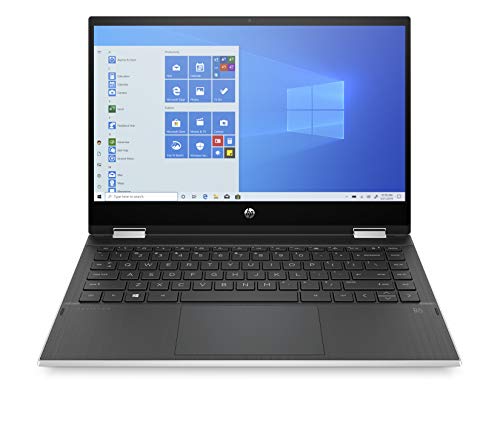
- CPU: 2.4GHz Intel Core i5-1135G7
- RAM: 8GB DDR4
- Storage: 256GB SSD
- Display: 14-inch FHD (1920 x 1080)
- GPU: Integrated Intel Iris Xe
- Battery: Up to 8 hours
The HP Pavilion x360 is a sleek and portable option that combines functionality with a stylish design. With its impressive specifications and flexible form factor, the Pavilion x360 offers a great platform for Roblox enthusiasts seeking a reliable and versatile device.
Flexible Design for Roblox on the Go: The HP Pavilion x360 features a 14-inch FHD (1920 x 1080) display and a 360-degree hinge, allowing you to switch between laptop, tent, stand, and tablet modes.
This versatility ensures a comfortable and customizable Roblox experience, whether you’re gaming on the go or collaborating with friends on building projects.
Responsive Performance for Roblox: Equipped with a 2.4GHz Intel Core i5-1135G7 processor, the HP Pavilion x360 provides responsive performance for Roblox gameplay.
You can enjoy smooth gameplay and fluid movements as you explore the vast Roblox universe, create stunning virtual worlds, or engage in exciting multiplayer battles.
Portable and Lightweight: Weighing just 3.55 lbs, the HP Pavilion x360 is a lightweight and portable option for Roblox enthusiasts who are constantly on the move. Whether you’re gaming at home or taking your laptop to a friend’s place, the Pavilion x360 is easy to carry and fits comfortably in your backpack.
Vibrant Display for Immersive Gaming: The 14-inch FHD display on the HP Pavilion x360 offers vibrant colors and sharp visuals, enhancing your Roblox experience. Immerse yourself in the intricate details of Roblox worlds, from the lush landscapes to the finely crafted character designs.
Long Battery Life for Extended Gameplay: With a battery life of up to 8 hours, the HP Pavilion x360 ensures that you can enjoy extended Roblox gameplay without worrying about running out of power. Spend more time exploring, building, and gaming, and less time searching for an outlet.
In conclusion, the HP Pavilion x360 is a versatile and reliable laptop for Roblox enthusiasts who value portability and performance. With its flexible design, responsive performance, portable form factor, vibrant display, and long battery life, the Pavilion x360 provides a seamless Roblox experience.
However, it’s important to consider the limited storage capacity and the potential limitations of integrated graphics when evaluating this model.
- What We Like
- Versatile design
- Responsive performance
- Portable and lightweight
- Vibrant display
- Long battery life
- What We Don’t Like
- Limited storage capacity
- Integrated graphics
7. Best Budget Gaming Laptop from MSI: MSI GV15
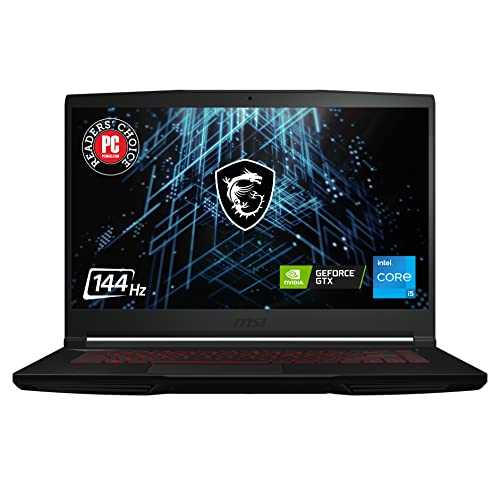
- CPU: 2.2GHz Intel Core i5-11400H
- RAM: 8GB DDR4
- Storage: 256GB SSD
- Display: 15.6-inch FHD (1920 x 1080)
- GPU: 4GB NVIDIA GeForce GTX 1650
- Battery: Up to 5 hours
The MSI GV15 is a solid contender. With its impressive specifications and affordable price point, the GV15 delivers a satisfying Roblox experience without breaking the bank. Let’s explore the key features and benefits of this laptop for Roblox gaming.
Affordable Gaming Power: The MSI GV15 is equipped with a 2.2GHz Intel Core i5-11400H processor and a 4GB NVIDIA GeForce GTX 1650 GPU, providing ample power for Roblox gameplay.
It delivers smooth performance, allowing you to navigate the virtual world, participate in multiplayer battles, and create your own immersive experiences within Roblox.
Immersive Visuals on a Full HD Display: Featuring a 15.6-inch FHD (1920 x 1080) display, the MSI GV15 offers vibrant and detailed visuals for an immersive gaming experience. Dive into the vibrant worlds of Roblox, appreciating the intricate details and captivating environments with sharp and clear graphics.
Compact and Portable Design: With a weight of just 4.1 lbs, the MSI GV15 is lightweight and portable, making it easy to carry for on-the-go gaming sessions. Whether you’re gaming at home, at a friend’s place, or on vacation, the GV15’s compact design ensures convenient portability without compromising on performance.
Budget-Friendly Option: One of the standout features of the MSI GV15 is its affordable price point. This laptop provides an excellent balance between performance and cost, making it an attractive choice for Roblox enthusiasts looking for a budget-friendly gaming solution.
Ample Storage for Roblox Games: With a 256GB SSD, the MSI GV15 offers sufficient storage space for your Roblox games and files. It ensures quick load times, allowing you to jump right into the action without any delays.
In conclusion, the MSI GV15 is a cost-effective and capable laptop for Roblox gaming. With its affordable price, immersive display, compact design, ample storage, and reasonable gaming performance, the GV15 is an excellent choice for budget-conscious Roblox enthusiasts.
However, it’s important to consider the limited RAM capacity and average battery life as potential drawbacks when evaluating this model.
- What We Like
- Affordable gaming option
- Immersive Full HD display
- Compact and portable design
- Budget-friendly price
- Ample storage capacity
- What We Don’t Like
- Limited RAM
- Average battery life
FAQs about Laptops for Roblox
Are Chromebooks a Good Option for Roblox?
They weren’t exactly built with playing Roblox in mind, but they will do the job. You can download Roblox from the Play Store and enjoy Roblox gaming without any trouble.
Is it Better to Play Roblox on a Desktop PC or Laptop?
Since Roblox doesn’t require high-end specs, it all comes down to your preference. If you’re a person on the go, a laptop will let you play wherever you are. If you prefer sitting in a gaming chair and gaming on a larger screen, a desktop PC is the right choice.
Can You Play Roblox on a Laptop?
Yes, you can play Roblox on a laptop. In addition to being able to play the game on your computer, you can also access it on your mobile device. Roblox is available for download on the App Store and Google Play.
Verdict
We hope that this list will help you choose the right laptop for playing Roblox. Let’s summarize:
- Are you after the best laptop for Roblox at a great price? Consider the Acer Aspire 3
- If you’re looking for a no-compromise Roblox gaming machine, the ASUS TUF Gaming F15 will surely scratch that itch.
- If you’re on a tighter budget, the HP Pavilion x360 packs enough power without denting your wallet.
- Roblox not enough? The ASUS ROG Strix G16 will do great at video editing and streaming.
If any questions pop up, be sure to let us know in the comments below. We’re glad to help!