

Not Just Laptops is supported by readers like you. When you buy through links on our site, we may earn a small commission at no additional cost to you. Learn more.
Whether you are a professional video editor who spends lots of time working with 4K footage or you have just developed an interest in video editing — choosing the right laptop for 4K video editing can be overwhelming.
Should you just go for a MacBook Pro and forget about gaming? Why are all the Windows laptops for 4K editing so heavy? Is it even possible to get everything you want?
Worry not. This article will cover different options and best 4K video editing laptops for different needs. We’ll start off with a buying guide and the required specs — and then dive into our top picks.
Table of Contents
- Minimum & Recommended System Requirements
- Buying Guide for Laptops for 4K Video Editing in 2023
- Top 7 Laptops for 4K Video Editing
- 1. Innovative Cooling System: ASUS ROG Zephyrus
- 2. Light and Long-Lasting Productivity: LG gram 17
- 3. Amazing 18-inch Display: ASUS ROG Strix Scar 18
- 4. Amazing Value: Sager NP8875D
- 5. 4K Video Editing & Gaming: Acer Predator Helios 16
- 6. M2 Chip Power and Efficiency: Apple MacBook Pro 16 M2
- 7. Ultimate Specs: MSI Titan GT77
- FAQs about Laptops for 4K Video Editing
- Why do you need a higher chunk of RAM for 4K video editing?
- What are the GPU-accelerated processes associated with 4K video editing?
- What is the most underrated feature associated with 4K Video editing laptops?
- Can a gaming laptop be used for 4K video editing?
- Is 32GB RAM overkill for 4K video editing tasks
- Verdict
Minimum & Recommended System Requirements
Laptops with the minimum set of relevant specifications are still good enough for almost every 4K video editing tasks but might not support simultaneous multitasking, courtesy of the overall system slowness.
Devices having the recommended system requirements are insanely powerful and often as fast as desktop replacements and workstation-grade notebooks, provided you use them to their full potential.
| Minimum | Recommended | |
|---|---|---|
| CPU | 11th Gen Intel Core i7 or AMD Ryzen 7 5000 series | 12th Gen Intel Core i9 or AMD Ryzen 9 6000 series |
| RAM | 16GB | 32GB |
| Storage | 512GB SSD | 1TB SSD |
| Display | 15.6-inch FHD (1920 x 1080) | 17.3-inch WQHD (2560 x 1440) |
| GPU | 4GB NVIDIA GeForce RTX 2000 or AMD RX 6000 series | 8GB NVIDIA GeForce RTX 3000 or AMD RX 6000 series |
Buying Guide for Laptops for 4K Video Editing in 2023
First of all, let’s look at the nature of 4K video edits and what kind of laptop choices are relevant to these requirements.
We would expect you to be a professional video editor with tasks including but not limited to multi-cam editing, advanced audio track managing, 3D compositing, and more.
Managing, editing, and processing a 4K video and the cumulative resolution of 3840 x 2160 pixels, frame-by-frame, is probably one of the most demanding jobs a laptop can do. Nothing stretches a processor more than a 4K video.
What do all these mean in terms of specs for 4K video editing?
A powerful CPU, preferably 6-core i7 or even the octa-core i9, should be at the heart of your machine for operational encoding, 4K playback, and frame-based editing, rendering, compressing, re-sequencing, and more.
In addition to that, 4K video editing requires the GPUs of the highest possible quality. It wouldn’t be wrong to say that the CPU-GPU combo determines the output quality.
While the processor handles the video editing logic, the graphics card takes the load of color grading and other GPU-accelerated processes off the shoulders of the chipsets. Besides, the existing VRAM also determines the speed of these graphics accelerated processes.
In addition to a powerful H-series or HK-series processor and a high-end GPU — preferably with Turing architecture – 4K video editing also requires a few other specs.
A massive chunk of RAM (32/64GB) is necessary if your application of choice includes the DaVinci Resolve, Vegas Pro, and others with similar processing requirements. Not just that, a higher RAM also prevents the gigantic 4K frames from slowing down the machine.
Last but not least, the display quality is equally important — but only in case viewport rendering is one of your priorities. A 4K editing laptop need not have a 4K screen if you are not interested in viewing the editing content in the most optimal format.
Viewport rendering of 4K videos is still possible with high-speed data ports that pair up with external displays.
If you still want a class-leading display on the laptop, opt for a 4K OLED screen.
By now, you’ve probably realized that 4K video editing laptops are not cheap. But the price does not always ensure the value — that’s what we’re here for.
Top 7 Laptops for 4K Video Editing
Finding the best laptop for editing and processing 4K videos can become an overwhelming experience, in the absence of expert insights. With the laptop market expanding at an unimaginable pace, it is necessary to consider the newest launches, considering the future-proof specs sheet, latest processors, and other computing resources.
As per expectations, our experts have put together a list of 7 laptops that can handle 4K video editing like a charm. While we had to sift through 40 models to come up with a list of 7, our segregations were based on relevant specifications, productivity-based attributes, aligned resources, and certainly the budget.
1. Innovative Cooling System: ASUS ROG Zephyrus
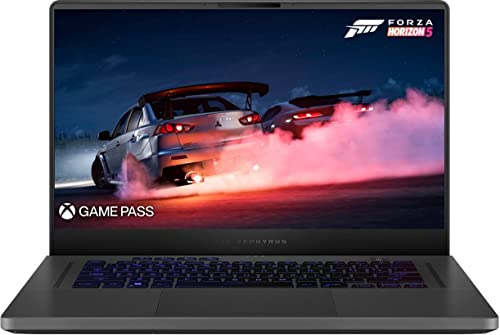
- CPU: 3.3GHz AMD Ryzen 9 6900HS
- RAM: 16GB DDR5
- Storage: 512GB SSD
- Display: 15.6-inch WQHD (2560 x 1440)
- GPU: 8GB NVIDIA GeForce RTX 3060
- Battery: Up to 10 hours
The ASUS ROG Zephyrus is a powerhouse designed to meet the demands of 4K video editing. Powered by the 3.3GHz AMD Ryzen 9 6900HS processor and accompanied by 16GB of DDR5 RAM, this laptop delivers exceptional performance to tackle even the most intensive editing tasks.
The 15.6-inch WQHD display with a resolution of 2560 x 1440 provides stunning visuals and ample screen real estate for precise editing. The laptop is equipped with the 8GB NVIDIA GeForce RTX 3060 GPU, ensuring smooth playback and rendering of high-resolution video content.
Despite its power, the ROG Zephyrus remains portable with a weight of 4.19 lbs and boasts a battery life of up to 10 hours, providing the flexibility needed for on-the-go editing. While it lacks an optical drive, this laptop is an excellent choice for videographers seeking performance and portability.
- What We Like
- Powerful Ryzen CPU
- High-Resolution Display
- Strong GPU Performance
- Portability
- Long Battery Life
- What We Don’t Like
- Moderate Weight
2. Light and Long-Lasting Productivity: LG gram 17

- CPU: 2.2GHz Intel Core i7-1260P
- RAM: 16GB DDR5
- Storage: 1TB SSD
- Display: 17-inch WQXGA (2560 x 1600)
- GPU: 4GB NVIDIA GeForce RTX 2050
- Battery: Up to 12 hours



The LG gram 17 redefines portability without compromising on power. With a weight of only 2.98 lbs, this laptop houses the 2.2GHz Intel Core i7-1260P processor and 16GB of DDR5 RAM, ensuring smooth multitasking for 4K video editing tasks.
Its 17-inch WQXGA display with a resolution of 2560 x 1600 provides a spacious canvas for editing, and the 4GB NVIDIA GeForce RTX 2050 GPU ensures exceptional graphics performance. With a battery life of up to 12 hours, the LG gram 17 offers extended editing sessions without the need for frequent charging.
The laptop’s 1TB SSD provides ample storage for large video files, and the lightweight build makes it easy to carry. However, the absence of an optical drive and limited GPU power may impact complex video editing projects.
- What We Like
- Lightweight Design
- High-Resolution Display
- Extended Battery Life
- Ample SSD Storage
- Portability
- What We Don’t Like
- Moderate GPU Power
3. Amazing 18-inch Display: ASUS ROG Strix Scar 18

- CPU: 2.2GHz Intel Core i9-13980HX
- RAM: 32GB DDR5
- Storage: 2TB SSD
- Display: 18-inch WQXGA (2560 x 1600)
- GPU: 12GB NVIDIA GeForce RTX 4080
- Battery: Up to 8 hours
The ASUS ROG Strix Scar 18 is a true powerhouse for 4K video editing, boasting the 2.2GHz Intel Core i9-13980HX processor, 32GB of DDR5 RAM, and a massive 2TB SSD. This laptop’s performance capabilities are further amplified by the 18-inch WQXGA display with a resolution of 2560 x 1600.
The 12GB NVIDIA GeForce RTX 4080 GPU ensures seamless playback and rendering of high-resolution video content. While the laptop weighs 6.77 lbs, its performance capabilities and generous storage make it a reliable companion for video editing on the go.
Despite its weight, the ROG Strix Scar 18 is a versatile choice, excelling in both gaming and content creation tasks. However, its portability may be compromised by its weight, and the absence of an optical drive could be a limitation for some users.
- What We Like
- High-Performance CPU
- Generous RAM and Storage
- Impressive GPU Power
- Large High-Resolution Display
- Versatility
- What We Don’t Like
- Heavyweight Design
4. Amazing Value: Sager NP8875D
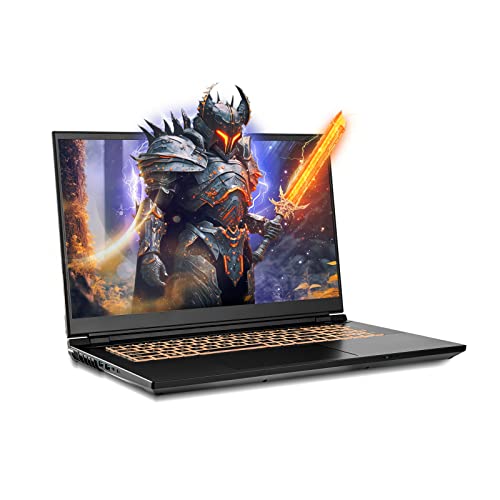
- CPU: 2.2GHz Intel Core i9-13900HX
- RAM: 64GB DDR5
- Storage: 2TB SSD
- Display: 17.3-inch WQHD (2560 x 1440)
- GPU: 8GB NVIDIA GeForce RTX 4060
- Battery: Up to 5 hours
The Sager NP8875D strikes a balance between performance and portability. With the 2.2GHz Intel Core i9-13900HX processor, a whopping 64GB of DDR5 RAM, and a spacious 2TB SSD, this laptop offers ample power for 4K video editing tasks.
The 17.3-inch WQHD display with a resolution of 2560 x 1440 provides a comfortable editing environment, and the 8GB NVIDIA GeForce RTX 4060 GPU ensures smooth playback and rendering of high-resolution videos.
Despite its powerful configuration, the Sager NP8875D remains relatively lightweight at 6.17 lbs. Its portability is further enhanced by its battery life of up to 5 hours, allowing for productivity on the go. However, the laptop’s relatively short battery life and the absence of an optical drive may impact long editing sessions.
- What We Like
- High-Performance CPU
- Abundant RAM and Storage
- Strong GPU Performance
- Portability
- Decent Battery Life
- What We Don’t Like
- Short Battery Life
5. 4K Video Editing & Gaming: Acer Predator Helios 16
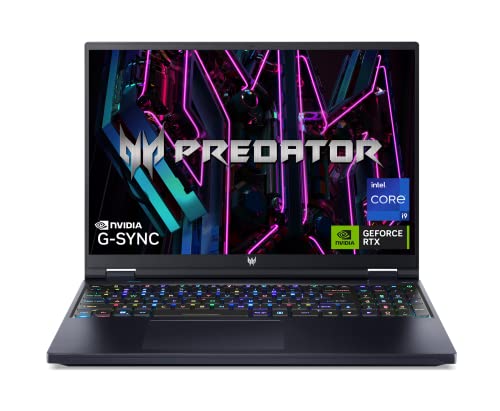
- CPU: 2.2GHz Intel Core i9-13900HX
- RAM: 32GB DDR5
- Storage: 2TB SSD
- Display: 16-inch WQXGA (2560 x 1600)
- GPU: 12GB NVIDIA GeForce RTX 4080
- Battery: Up to 8 hours
The Acer Predator Helios 16 is a beast of a laptop designed for uncompromising performance in 4K video editing. Powered by the 2.2GHz Intel Core i9-13900HX processor and equipped with 32GB of DDR5 RAM, this laptop ensures seamless multitasking and efficient editing workflows.
The 16-inch WQXGA display with a resolution of 2560 x 1600 offers ample screen space for editing while the 12GB NVIDIA GeForce RTX 4080 GPU ensures smooth rendering and playback of high-resolution videos. With a battery life of up to 8 hours, the Predator Helios 16 provides ample time for editing on the go.
Despite its performance prowess, this laptop weighs in at 5.73 lbs, making it relatively portable for a laptop of its class. Its robust GPU and ample RAM make it a solid choice for 4K video editing projects, though its weight and size may limit its portability compared to lighter options.
- What We Like
- High-Performance CPU
- Abundant RAM and Storage
- Powerful GPU
- High-Resolution Display
- Decent Battery Life
- What We Don’t Like
- Moderate Portability
- Weight
6. M2 Chip Power and Efficiency: Apple MacBook Pro 16 M2

- CPU: 3.5GHz Apple M2 12-Core
- RAM: 16GB DDR5
- Storage: 512GB SSD
- Display: 16.2-inch Retina XDR (3456 x 2234)
- GPU: Integrated Apple 19-Core
- Battery: Up to 15 hours


The Apple MacBook Pro 16 M2 is a premium option for 4K video editing, offering top-notch performance and a stunning display. Powered by the 3.5GHz Apple M2 12-Core processor and equipped with 16GB of DDR5 RAM, this laptop delivers exceptional power for editing tasks.
The 16.2-inch Retina XDR display with a resolution of 3456 x 2234 provides accurate color reproduction and detailed visuals, perfect for video editing. The integrated Apple 19-Core GPU ensures seamless playback and rendering of high-resolution content.
Weighing 4.8 lbs, the MacBook Pro 16 M2 is relatively lightweight for its class, offering a balance between performance and portability. Its impressive battery life of up to 15 hours provides extended editing sessions without the need for constant charging. However, the laptop’s premium features come at a higher price point.
- What We Like
- Powerful Apple CPU
- High-Resolution Retina Display
- Impressive GPU Performance
- Extended Battery Life
- Portability
- What We Don’t Like
- Higher Price
- Limited Customization Options
7. Ultimate Specs: MSI Titan GT77

- CPU: 2.2GHz Intel Core i9-13980HX
- RAM: 64GB DDR5
- Storage: 2TB SSD
- Display: 17.3-inch UHD (3840 x 2160)
- GPU: 12GB NVIDIA GeForce RTX 4080
- Battery: Up to 5 hours
The MSI Titan GT77 is a true powerhouse tailored for the most demanding 4K video editing tasks. With the 2.2GHz Intel Core i9-13980HX processor, a massive 64GB of DDR5 RAM, and a spacious 2TB SSD, this laptop ensures unrivaled performance.
The 17.3-inch UHD display with a resolution of 3840 x 2160 provides exceptional visuals and precise color accuracy, essential for professional video editing. The 12GB NVIDIA GeForce RTX 4080 GPU guarantees smooth rendering and playback of high-resolution videos.
While the laptop’s weight of 7.28 lbs may impact portability, its performance capabilities make it an ideal choice for content creators who require immense computing power. The Titan GT77 is an investment for those seeking the pinnacle of performance for 4K video editing.
- What We Like
- High-Performance CPU
- Abundant RAM and Storage
- Top-Tier GPU Power
- UHD Display
- Professional-Grade Performance
- What We Don’t Like
- Heavyweight Design
- Limited Portability
FAQs about Laptops for 4K Video Editing
Why do you need a higher chunk of RAM for 4K video editing?
While video editing alone stretches the system RAM to the brink, 4K frames take up a lot of flash memory when it comes to reaching the CPU for getting processed.
Therefore, 4K video editing requires a massive chunk of system RAM as anything less than 16GB might be relinquished in almost no time, thereby slowing down the system, alarmingly.
What are the GPU-accelerated processes associated with 4K video editing?
The most important GPU-accelerated video editing tasks, relevant to 4K videos include rendering, which signifies projecting the edits onto the screen followed by 3D processes, animations, graphics-based effects, color grading, color correction, and more.
What is the most underrated feature associated with 4K Video editing laptops?
While the processor, RAM, and every other primary attribute have their well-defined place, we would suggest you opt for notebooks with at least one Thunderbolt 3 port.
This feature allows you to pair external 4K displays for optimal encoding and rendering, provided the laptop doesn’t have the requisite display resolution for the same. Besides, Thunderbolt 3 port also allows you to pair external GPUs for better rendering output.
Can a gaming laptop be used for 4K video editing?
Gaming laptops usually have exceptional processing resources to work with, which can be used for achieving faster 4K editing performances. Besides, high-end gaming notebooks also feature top-of-the-line GPUs and, therefore, ensure better rendering quality.
Is 32GB RAM overkill for 4K video editing tasks
Not at all as certain professionals even consider 32GB RAM as the bare minimum for certain high-end and demanding tasks like viewport rendering and 3D editing. Unlike RAW HD videos and basic processes, 4K videos need to be projected onto the CPU and GPU at enviable speeds.
While VRAM makes processing easier for the graphics card, the majority of editing processes are CPU-intensive and call for a larger chunk of RAM.
Verdict
Every 4K video editing laptop mentioned on the list is powerful and useful in its own right. While none of the models can be tagged as affordable, our experts have still tried to segregate selections based on price point and budget.
- For MacBook users, the Apple MacBook Pro 16 M2 is easily the best video editing laptop in the retail space.
- Moreover, if you are trying to purchase something for as close as $1000 but without compromising on quality, the ASUS ROG Zephyrus would be the most obvious recommendation.
- Lastly, if you are an enthusiastic 4K editor and not particularly concerned about intricate processes, the innovative MSI Titan GT77 is the best possible choice. This laptop is an all-inclusive professional marvel that doesn’t only support 4K video editing but can also make room for other creative tasks.
Which laptop are you getting? Please comment below to help other video editors make an informed purchase decision.