Not Just Laptops is supported by readers like you. When you buy through links on our site, we may earn a small commission at no additional cost to you. Learn more.
If you’re here because your current laptop isn’t made for Twitch, or if this will be your first streaming laptop, then you probably want to ensure that the new laptop you pick will meet all system requirements, so that you can win the streaming game.
Excellent, all-around laptops dominate the market today, and it’s not hard to find a laptop that fulfills all Twitch requirements. But do you know what’s hard? Find a laptop that suits you.
One that fits your budget, your needs, and your personality. That’s why we’ve put together this comprehensive review for you.
Here, you will find the best laptops for Twitch streaming and gaming.
Excited? Let’s begin.
Table of Contents
- Minimum & Recommended System Requirements
- Buying Guide for Laptops for Streaming on Twitch
- Do You Really Need a Dedicated Streaming Computer?
- Top 7 Laptops for Streaming on Twitch
- 1. Powerful Beast from MSI: MSI Titan
- 2. Top Premium 17″ Laptop: Alienware X17 R2
- 3. Budget Option for Streaming: Acer Nitro 5
- 4. Stunning Display & Great Build Quality: ASUS ROG Strix G16
- 5. Great Mid-Range Option: ASUS TUF Gaming
- 6. Value-packed Streaming Laptop: HP Victus
- 7. Entry-Level Twitch Streaming: Lenovo IdeaPad Gaming 3
- FAQs about Laptops for Streaming on Twitch
- Verdict
Minimum & Recommended System Requirements
The basic system requirements for you to stream Twitch are below. But, keep in mind that these are general requirements and are subject to change based on your stream quality settings, selected encoder, and the game you are trying to stream.
| Minimum | Recommended | |
|---|---|---|
| CPU | 11th Gen Intel Core i5 or AMD Ryzen 5 5000 series | 12th Gen Intel Core i7 or AMD Ryzen 7 6000 series |
| RAM | 8GB | 16GB |
| Storage | 256GB SSD | 512GB SSD |
| Display | 15.6-inch FHD (1920 x 1080) | 17.3-inch FHD (1920 x 1080) |
| GPU | 4GB NVIDIA GeForce RTX 2000 series | 4GB NVIDIA GeForce RTX 3000 or AMD RX 6000 series |
Buying Guide for Laptops for Streaming on Twitch
We believe these factors are essential to your buying decision. Before you get a streaming laptop, ensure it has everything that we’ve listed below so that it’s your ‘perfect purchase’.
Processor
A high-quality processor should be your top priority. It will ensure that the video player runs smoothly.
There are two types of processors available in the market. You can either go for Intel or an AMD processor.
While x264 encoding that Twitch uses needs to use either your laptops’ CPU to encode video or dedicated GPU. As a minimum look for a computer with Intel Core i5 11th generation (numbers start with 11 after i5) or AMD Ryzen equivalent.
For better performance, higher image quality we recommend Intel Core i5 11th generation or Intel Core i7 11th Generation or better or AMD Ryzen equivalent. All laptops on our list are in the recommended or better category.
RAM
RAM is an essential component for smooth and fast streaming. As a streamer, you’re switching between various apps such as the browser, OBS, and the music player, and for a flawless experience, the RAM must be at least 8GB, if you are looking for more than basic streaming.
Nowadays, RAM is available in different series such as DDR4, and DDR5. You can also get it in separate memory storage such as 8GB, 16GB, and 32GB.
Look for a laptop with a minimum of 8GB RAM with 4GB free for streaming. However, if you’re an active gamer or game developer who usually has multiple applications running simultaneously, we recommend going with 8GB RAM or more.
Storage
Although the 256GB SSD storage works fine for streaming on Twitch, we recommend getting 512GB or more if you plan to save some of these streams.
Display
While there isn’t a minimum requirement for display size, in our experience, a laptop display for streaming should be at least 14-inch, with a full HD 1920 x 1080 resolution.
You can also go for a full HD display of 15.6-inch with LED-backlit IPS for providing an even more enjoyable streaming session.
However, if you are looking for a desktop replacement, a 17-inch display size would be better. Or you can get an external monitor.
GPU
While one of the best GPU choices for streaming on Twitch is NVIDIA RTX 4060, the main thing to keep in mind is that the GPU must be DirectX 11 compatible. And all laptop recommendations on this page are, of course, compatible with DirectX 11.
You can also go for NVIDIA RTX 3050 or NVIDIA GTX 2050. They are known as dedicated graphics cards. The PCB board and GPU chips have reliable power and cooling solutions of their own, and there is a pool of dedicated RAM too.
Integrated GPUs are off the list because they cannot use faster RAM as dedicated GPUs do — they don’t have a dedicated power supply or PCB either.
If you ensure these factors above, you can confidently say that you’ve bought the best laptop for Twitch streaming.
So which ones are the top selections for streaming?
Well, let’s look at the system requirements and then our laptop selection.
Do You Really Need a Dedicated Streaming Computer?
If you have a powerful PC or laptop, you don’t need a separate computer for streaming on Twitch. However, for a computer to process gaming and streaming information in real-time is a resource-intensive task.
But we dug deeper below. Here’s our take on this question.
Pros of Having a Dedicated Streaming Computer
- Higher FPS on Your Gaming PC: You will get a higher frame rate per second on your gaming PC or laptop since fewer processes will run on it.
- Better Streaming Experience: A streaming computer solely focuses on the encoding task. As a result, you get a better image quality for your stream.
- Organized: One of the significant advantages of having a dedicated computer is keeping the streaming separate from your gaming environment. This also means that your hard drives will be separate and organized.
Cons of Having a Dedicated Streaming Computer
- Cost: While this is obvious, it has to be mentioned. You have to buy a dedicated streaming laptop or PC and that hinders most people’s decision. The good news is that you don’t need as powerful of a laptop as you do for gaming.
- Takes up More Physical Space: Two computers will also require more physical space. If you have limited space, buying a dedicated laptop might toughen things.
- Can Hinder Audio Quality: More PCs also mean more fans; this can interfere with your audio quality as well.
Though the pros and cons are numerically equal only you can decide if the better performance & experience is worth the investment.
However, since you are on this page you probably already made up your mind and want to get your hands on a Twitch streaming laptop.
If that’s the case, there are a few critical factors you want to consider before purchasing a streaming laptop – let’s take a look.
Top 7 Laptops for Streaming on Twitch
Let’s now count down our top 10 picks for Twitch streaming! We’ll start our list with the best on top and the entry-level models towards the bottom on this page.
1. Powerful Beast from MSI: MSI Titan

- CPU: 2.2GHz Intel Core i9-13980HX
- RAM: 64GB DDR5
- Storage: 2TB SSD
- Display: 17.3-inch UHD (3840 x 2160)
- GPU: 12GB NVIDIA GeForce RTX 4080
- Battery: Up to 5 hours
Prepare to be blown away by the sheer might of the MSI Titan. At its core roars a ferocious 2.2GHz Intel Core i9-13980HX processor, an eight-core juggernaut engineered for unrivaled processing power.
But that’s just the beginning. With a colossal 64GB of DDR5 RAM, the Titan laughs in the face of multitasking demands, ensuring that your gaming and streaming tasks run smoother than ever.
The 17.3-inch UHD display boasting an astonishing resolution of 3840 x 2160 is nothing short of a visual masterpiece. This screen is a canvas where every pixel contributes to the vibrant tapestry of your stream.
Bolstered by the monstrous 12GB NVIDIA GeForce RTX 4080, your graphics performance is elevated to stratospheric levels, delivering impeccable visual quality that’ll leave your audience spellbound.
Storage limitations are a thing of the past with the 2TB SSD that accompanies the Titan. Store your entire gaming library, stream overlays, and video content with room to spare.
And don’t be fooled by its powerhouse persona – the Titan manages to retain a manageable weight of 7.28 lbs, making it a formidable companion for your on-the-go streaming endeavors. With a battery life of up to 5 hours, you’ve got ample time to keep your Twitch audience hooked with your electrifying streams.
- What We Like
- Unmatched Processing Power
- Stunning UHD Display
- Monstrous Graphics Performance
- Ample Storage Capacity
- Robust Battery Life
- What We Don’t Like
- Heavier Build
- Premium Price Tag
2. Top Premium 17″ Laptop: Alienware X17 R2
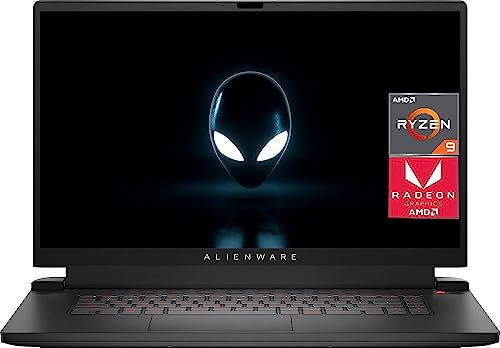
- CPU: 3.3GHz AMD Ryzen 9 6900HX
- RAM: 64GB DDR5
- Storage: 1TB SSD
- Display: 17.3-inch FHD (1920 x 1080)
- GPU: 12GB AMD Radeon RX 6850M XT
- Battery: Up to 6 hours
For those seeking both performance and aesthetics, the Alienware X17 R2 shines bright. Armed with the 3.3GHz AMD Ryzen 9 6900HX processor and a massive 64GB of DDR5 RAM, this laptop is ready to conquer demanding streaming and gaming tasks with finesse.
The 17.3-inch FHD display, boasting a resolution of 1920 x 1080, immerses you in the gaming realm. With the 12GB AMD Radeon RX 6850M XT enhancing visuals, your streaming output takes on a new level of detail. The 1TB SSD ensures swift data access, eradicating storage constraints.
Weighing in at 6.6 lbs, the X17 R2 strikes equilibrium between performance and portability. With a battery life of up to 6 hours, you’re equipped for uninterrupted streaming sessions, whether showcasing your gaming prowess or connecting with your viewers.
- What We Like
- Blazing Processing Speed
- Stunning FHD Display
- Remarkable Graphics Performance
- Ample RAM for Multitasking
- Decent Battery Life
- What We Don’t Like
- Slightly Heavier
- Premium Cost
3. Budget Option for Streaming: Acer Nitro 5
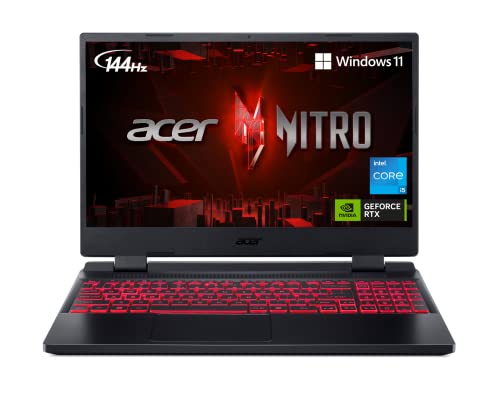
- CPU: 2.5 GHz Intel Core i5-12500H
- RAM: 8GB DDR4
- Storage: 512GB SSD
- Display: 15.6-inch FHD (1920 x 1080)
- GPU: 4GB NVIDIA GeForce RTX 3050
- Battery: Up to 6 Hours
The Acer Nitro 5 proves that power can be budget-friendly. Propelled by the 2.5 GHz Intel Core i5-12500H processor and equipped with 8GB of DDR4 RAM, this laptop ensures fluid multitasking and seamless streaming experiences.
The 15.6-inch FHD display, sporting a 1920 x 1080 resolution, offers a clear window into your gaming world. Enhanced by the 4GB NVIDIA GeForce RTX 3050, your streaming visuals are captivating and immersive. While the 512GB SSD provides respectable storage space, the limited RAM might influence resource-intensive tasks.
Weighing 5.51 lbs, the Nitro 5 balances performance and portability, catering to mobile streamers. Backed by a battery life of up to 6 hours, you remain engaged with your audience throughout your streaming endeavors.
Stay tuned for Part 2, where we delve into the remaining laptops that promise to redefine your Twitch streaming experience in 2023. From sleek designs to blazing performance, these laptops are poised to elevate your streaming journey.
Watch our Acer Nitro 5 Review
This YouTube review was created by the Not Just Laptops team. The specs may slightly differ from the laptop in the article.
- What We Like
- Budget-Friendly Option
- Responsive Processor
- Vibrant FHD Display
- Solid Graphics Performance
- Decent Battery Life
- What We Don’t Like
- Limited RAM
- Moderate Storage
4. Stunning Display & Great Build Quality: ASUS ROG Strix G16
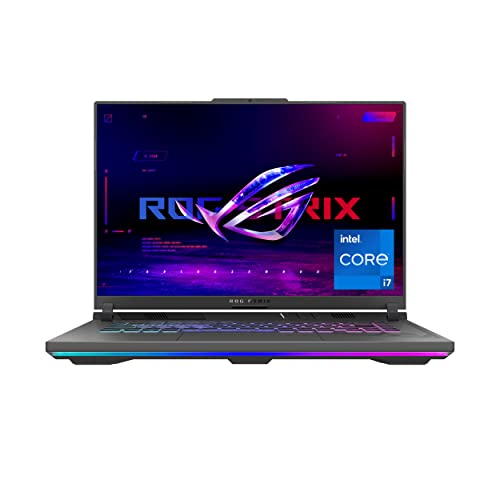
- CPU: 2.6GHz Intel Core i7-13650HX
- RAM: 16GB DDR5
- Storage: 512GB SDD
- Display: 16-inch FHD (1920 x 1200)
- GPU: 8GB NVIDIA GeForce RTX 4060
- Battery: Up to 8 Hours
The ASUS ROG Strix G16 is a gaming powerhouse that doubles as a streaming marvel. Featuring the 2.6GHz Intel Core i7-13650HX processor and a substantial 16GB of DDR5 RAM, this laptop effortlessly handles streaming and gaming tasks with finesse.
The 16-inch FHD display, boasting a resolution of 1920 x 1200, offers a balance between immersion and clarity. Bolstered by the 8GB NVIDIA GeForce RTX 4060, your streaming visuals are brought to life with stunning detail. The 512GB SSD ensures swift data access and system responsiveness.
Weighing 5.51 lbs, the Strix G16 strikes a commendable equilibrium between performance and portability. With an extended battery life of up to 8 hours, you’re geared for prolonged streaming sessions, ensuring a seamless connection with your Twitch audience.
- What We Like
- Impressive Processor Speed
- Crisp FHD Display
- Ample Graphics Power
- Generous RAM
- Extended Battery Life
- What We Don’t Like
- Slightly Heavier
- Moderate Storage
5. Great Mid-Range Option: ASUS TUF Gaming

- CPU: 2.5 GHz Intel Core i5-12500H
- RAM: 16GB DDR4
- Storage: 512GB SSD
- Display: 15.6-inch FHD (1920 x 1080)
- GPU: 4GB NVIDIA GeForce RTX 3050
- Battery: Up to 5 hours
The ASUS TUF Gaming laptop offers a compelling blend of performance and affordability. Empowered by the 2.5 GHz Intel Core i5-12500H processor and backed by 16GB of DDR4 RAM, this laptop strikes a balance between multitasking and streaming prowess.
The 15.6-inch FHD display, featuring a resolution of 1920 x 1080, becomes your portal to the gaming universe. Enhanced by the 4GB NVIDIA GeForce RTX 3050, your streaming visuals are brought to life with captivating detail. With a 512GB SSD, you have adequate storage space for your streaming setup.
Weighing merely 4.85 lbs, the TUF Gaming laptop is designed for on-the-go content creators. Although the battery life lasts up to 5 hours, the lightweight design makes it an excellent companion for mobile streaming sessions.
- What We Like
- Budget-Friendly Choice
- Responsive Processing
- Clear FHD Display
- Solid Graphics Performance
- Lightweight Design
- What We Don’t Like
- Limited RAM
- Moderate Battery Life
6. Value-packed Streaming Laptop: HP Victus
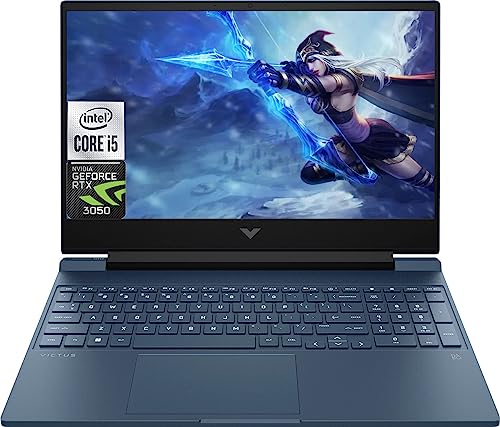
- CPU: 2.1GHz Intel Core i5-13420H
- RAM: 16GB DDR5
- Storage: 512GB SSD
- Display: 15.6-inch FHD (1920 x 1080)
- GPU: 4GB NVIDIA GeForce RTX 3050
- Battery: Up to 5 hours
The HP Victus laptop offers versatility for streamers who value performance and mobility. Equipped with the 2.1GHz Intel Core i5-13420H processor and 16GB of DDR5 RAM, this laptop handles streaming demands while leaving room for multitasking.
The 15.6-inch FHD display, featuring a resolution of 1920 x 1080, provides a clear window into your gaming escapades. The 4GB NVIDIA GeForce RTX 3050 collaborates to enhance your streaming visuals, ensuring your content is engaging and immersive. The 512GB SSD delivers responsive storage access for your streaming assets.
Weighing 5.06 lbs, the Victus strikes a sweet spot between performance and portability. With a battery life of up to 5 hours, you’re equipped for extensive streaming sessions, making this laptop an appealing option for content creators on the move.
- What We Like
- Balanced Processing Speed
- Vibrant FHD Display
- Decent Graphics Performance
- Ample DDR5 RAM
- Portability at Its Best
- What We Don’t Like
- Limited Storage
- Moderate Battery Life
7. Entry-Level Twitch Streaming: Lenovo IdeaPad Gaming 3
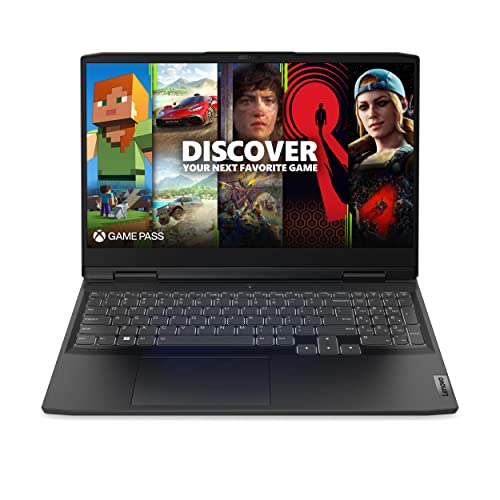
- CPU: 3.3GHz AMD Ryzen 5 6600H
- RAM: 8GB DDR5
- Storage: 256GB SSD
- Display: 15.6-inch FHD (1920 x 1080)
- GPU: 4GB NVIDIA GeForce RTX 3050
- Battery: Up to 5 hours

The Lenovo IdeaPad Gaming 3 offers efficiency and affordability in one package. Equipped with the 3.3GHz AMD Ryzen 5 6600H processor and 8GB of DDR5 RAM, this laptop ensures smooth streaming experiences without breaking the bank.
The 15.6-inch FHD display, featuring a resolution of 1920 x 1080, immerses you in your gaming and streaming world. The 4GB NVIDIA GeForce RTX 3050 contributes to enhanced streaming visuals, ensuring your content is captivating. With a 256GB SSD, you have responsive storage for your streaming essentials.
Weighing a mere 5.01 lbs, the IdeaPad Gaming 3 is designed for easy mobility. While the battery life lasts up to 5 hours, the lightweight design makes it a suitable choice for streamers seeking to connect with their audience wherever they go.
- What We Like
- Cost-Effective Solution
- Responsive Processor
- Clear FHD Display
- Solid Graphics Performance
- Lightweight Build
- What We Don’t Like
- Limited RAM
- Moderate Battery Life
FAQs about Laptops for Streaming on Twitch
Here are some FAQs about streaming laptops.
What specs do I need for streaming?
To have a smooth streaming experience, you need to have at least a 6-core CPU, 8GB RAM, a dedicated GPU, along with 4GB graphics memory. You can upgrade these specs according to your need and budget.
Can I use a laptop for streaming?
Yes, you can use a laptop for streaming. Many famous streamers stream on their laptops. But, you have to ensure that your laptop meets the hardware specifications.
What equipment do I need to stream?
You need to have a decent gaming laptop, a microphone, a headset, and a webcam. While anyone can stream, having this essential equipment is a must.
Do I need a dedicated GPU to stream on Twitch?
If you want your games to stream in high quality, you will need a dedicated graphics card. That’s because the majority of the games require a dedicated GPU to run smoothly. In addition to this, it also gives your laptop the boost that it needs for streaming.
Do I need a mixer for streaming?
If your stream setup includes different audio inputs from two gaming PCs and several microphones that need to have their sound level adjustment, you need to have a mixer for streaming.
Verdict
All laptops have functions and specifications on their own, but those mentioned above are the best ones you can get for streaming on Twitch in 2023.
If you are looking for the best laptop for streaming, the MSI Titan is worth trying. Even though the price is a bit higher, the specs speak for themselves. However, if you are looking for something cheaper, Alienware X17 R2 would be a good option.
Nonetheless, we are sure you can find a laptop that best suits your needs on our list above. And don’t hesitate to leave a comment if you have anything to ask.
Other Suggested Articles for You: